
 Planet Clicker 2
Geometry Dash
- Developer
- RobTop Games
- Released
- August 2013
- Game Engine
- Cocos2d-x
- Platforms
- Android, iOS, Windows, macOS
- Orientation
- Landscape
- Players
- Single player
- Price
- One-time purchase
- Play Opens
- Google Play
About Geometry Dash
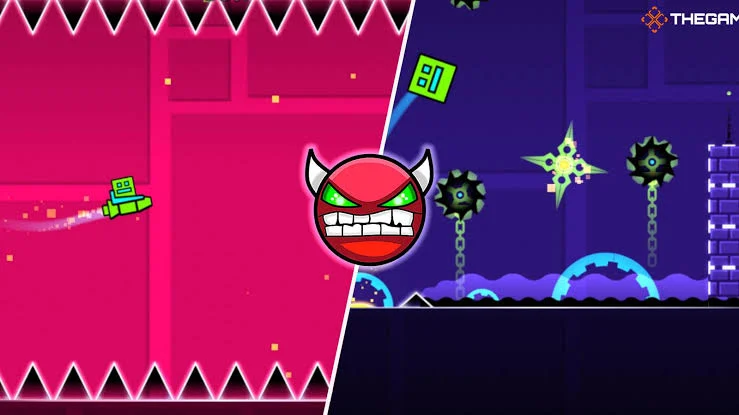
RobTop Games' rhythm platformer: jump, fly and flip through spike-filled levels timed to music, plus a huge library of player-made levels.
Geometry Dash is a rhythm-based platformer made by Swedish developer Robert Topala under his studio RobTop Games. You guide a small icon through levels full of spikes, saws and moving blocks, and every jump is timed to the soundtrack. The controls use a single input, but the levels demand near perfect timing, which is why the game is famous for being hard.
It came out on iOS and Android on August 13, 2013 and reached Steam on Windows and macOS in December 2014. Besides the official levels there is a full level editor, and players have used it to build and share a huge library of their own stages. Update 2.2, released in December 2023, added a platformer mode, a new swing game mode and new official levels.
The full game is a one-time purchase with no in-app purchases. RobTop also offers free spin-offs, such as Geometry Dash Lite, with fewer levels and ads.
Tips For Beating Hard Levels
- Use practice mode to place checkpoints and learn a level one section at a time.
- Listen to the music, because the hardest jumps usually land on the beat.
- In ship sections, use short, gentle taps to keep the ship level instead of holding the button down.
- Take a break on very hard levels. Fresh hands often clear a part you failed many times.
Features
- Rhythm Platforming: Every jump is timed to the soundtrack
- One Touch Controls: Tap, click or press a key to jump and fly
- Level Editor: Build your own levels and share them online
- Player Levels: Play a huge library of stages made by the community
- Practice Mode: Place checkpoints to learn the tricky parts
- Platformer Mode: Added in update 2.2 for levels you move through freely
How To Play Geometry Dash
- Press Play to open the official Google Play page and install the game.
- Start with Stereo Madness, the first official level.
- Tap or click to jump over spikes and through gaps.
- Hold to fly when your icon turns into a ship or another mode.
- Collect stars and coins to unlock new icons and colors.
Geometry Dash Controls
- Click or tap or Space or up arrow jump
- Hold keep jumping or fly
- Arrow keys or A+D move left and right in platformer mode
Our Take On Geometry Dash
What We Like
- Tight one-button controls that always feel fair
- The level editor gives it almost endless replay value
What Could Be Better
- The difficulty climbs very fast
- The full version is not free
Who Checked This Game
- Last checked on November 3, 2026
- Play opens the official Google Play page
- Made and owned by RobTop Games
Every Play button on Mopoga opens the official source of the game: the developer's website, its store page or the developer's own browser build. Details on this page come from the developer and the store listing, and we check them when the game is updated.
Frequently Asked Questions About Geometry Dash
How Much Does Geometry Dash Cost?
The full Geometry Dash is a one-time purchase on Google Play, the App Store and Steam, and the price depends on your country. There are no in-app purchases. If you want to try it first, Geometry Dash Lite is free with a smaller set of levels.
Can I Make My Own Levels In Geometry Dash?
Yes. The full game includes a level editor where you build stages, choose the music and upload them for other players to try.
How Do I Play Geometry Dash?
Press Play Geometry Dash and the official Google Play page opens. Tap Install there, then open the game from your home screen. It plays in landscape, so turn your phone sideways.
Do I Need To Download Geometry Dash?
Yes. Geometry Dash is a mobile game, so you install it from Google Play.
Can I Play Geometry Dash On My Phone?
Yes. Geometry Dash works on Android, iOS, Windows, macOS. On a phone it plays in landscape.
What Are The Controls In Geometry Dash?
Use Click or tap or Space or up arrow to jump, Hold to keep jumping or fly, Arrow keys or A + D to move left and right in platformer mode.
What Kind Of Game Is Geometry Dash?
Geometry Dash is a Arcade game. It is tagged 2D, Level Editor, Mobile, Platformer and Rhythm. Mode: Single player.
Who Made Geometry Dash?
Geometry Dash is made by RobTop Games and built with Cocos2d-x. You can reach the developer through Game Support on this page.
When Did Geometry Dash Come Out?
Geometry Dash came out in August 2013.
Can I Play Geometry Dash With Friends?
Geometry Dash is a single player game, so you play on your own and try to beat your best result.
You May Also Like
All games, names and images are the property and trademarks of their developers. Mopoga links to the official source of each game and does not host modified copies.