
 Chess
Car Parking Multiplayer
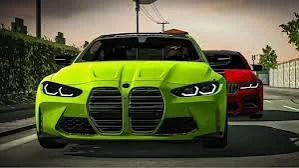
- Developer
- olzhass
- Last Updated
- November 2026
- Platforms
- Android, iOS
- Orientation
- Landscape
- Installs
- 100,000,000+ on Google Play
- Price
- Free
- Play Opens
- Google Play
About Car Parking Multiplayer
Parking challenges plus an open world multiplayer city: drive, tune and trade cars, chat and roleplay with other players.
Car Parking Multiplayer starts as a parking game with dozens of levels that test steering, mirrors and careful reversing. The bigger draw is its open world online mode, where players drive around a city, meet up, race, roleplay as taxi or police drivers and trade cars with each other.
Cars can be tuned with engines, suspension and transmission upgrades, and customized with paint, wheels and body kits. Gas stations, car washes and a garage add a realistic touch, and you can walk around as your character too.
One Developer, A Busy City
Car Parking Multiplayer is made by olzhass, an independent developer. It became one of the most popular car games on mobile thanks to its open multiplayer world and detailed customization.
Parking Like A Pro
- Use the different camera views when reversing into tight spots.
- Drive slowly and steer early instead of making sharp corrections.
- Upgrade brakes and steering before speed.
- Be careful when trading cars with other players.
Features
- Parking Levels: Many tight challenges
- Open World: A city to drive and explore
- Online Multiplayer: Meet and play with others
- Car Tuning: Engines, suspension and more
- Customization: Paint, wheels and body kits
- Car Trading: Swap cars with players
How To Play Car Parking Multiplayer
- Press Play to open Car Parking Multiplayer on Google Play and install it.
- Choose single player parking or online mode.
- Use the wheel and pedals to drive and park.
- Earn money to buy and tune cars.
- Join an online server to drive with other players.
Car Parking Multiplayer Controls
- Steering wheel steer
- Gas or brake pedals drive
- Gear selector drive or reverse
- Camera button change view
What's New In The November 2026 Update
Sprint Rush Event
New Phone design
Phone Calls
Permanent Contracts
Edit character HUD
CPM Editor. New Road System
New Skins
New Location
New Poses
New & reworked cars
Optimization
Bug fixes
Our Take On Car Parking Multiplayer
What We Like
- Huge customization options
- Lively online world
What Could Be Better
- Online servers can be messy
- Graphics vary across devices
Who Checked This Game

Mopoga Team
Start with one Article about something you’re genuinely excited to share. Send it to editor,mopoga@gmail.com with the subject line “Gaming Article Submission”, and we’ll take it from there.
- Last checked on November 16, 2026
- Play opens the official Google Play page
- Made and owned by olzhass
Every Play button on Mopoga opens the official source of the game: the developer's website, its store page or the developer's own browser build. Details on this page come from the developer and the store listing, and we check them when the game is updated.
Frequently Asked Questions About Car Parking Multiplayer
Can You Play Car Parking Multiplayer Online?
Yes. The online mode lets you drive in an open world with other players, race, roleplay and trade cars.
Is Car Parking Multiplayer Only About Parking?
No. It has many parking levels, but the open world mode adds free driving, tuning and multiplayer.
Is Car Parking Multiplayer Free To Play?
Yes. Car Parking Multiplayer is free to play.
How Do I Play Car Parking Multiplayer?
Press Play Car Parking Multiplayer and the official Google Play page opens. Tap Install there, then open the game from your home screen. It plays in landscape, so turn your phone sideways.
Do I Need To Download Car Parking Multiplayer?
Yes. Car Parking Multiplayer is a mobile game, so you install it from Google Play. The download is free.
Can I Play Car Parking Multiplayer On My Phone?
Yes. Car Parking Multiplayer works on Android, iOS. On a phone it plays in landscape.
What Are The Controls In Car Parking Multiplayer?
Use Steering wheel to steer, Gas or brake pedals to drive, Gear selector to drive or reverse, Camera button to change view.
What Kind Of Game Is Car Parking Multiplayer?
Car Parking Multiplayer is a Car game. It is tagged Car, Multiplayer, Open World and Parking.
Who Made Car Parking Multiplayer?
Car Parking Multiplayer is made by olzhass.
When Did Car Parking Multiplayer Come Out?
The latest update to Car Parking Multiplayer arrived in November 2026.
You May Also Like






All games, names and images are the property and trademarks of their developers. Mopoga links to the official source of each game and does not host modified copies.